
Merging
Merging series
The article series provides guidance on performing package merges.
- Process overview:
Overview
Merging (also called “delta rebasing”) is the process of taking all Ubuntu changes (Ubuntu delta) made on top of one Debian version of a package and re-doing them on top of a new Debian version of the package. See Merges & syncs for more context information.
This is not to be confused with a git merge, wherein two diverging branches are reconciled together. The Ubuntu merge process (counter-intuitively) does not directly involve a git merge.
The following diagram compares a standard git merge with an Ubuntu merge:
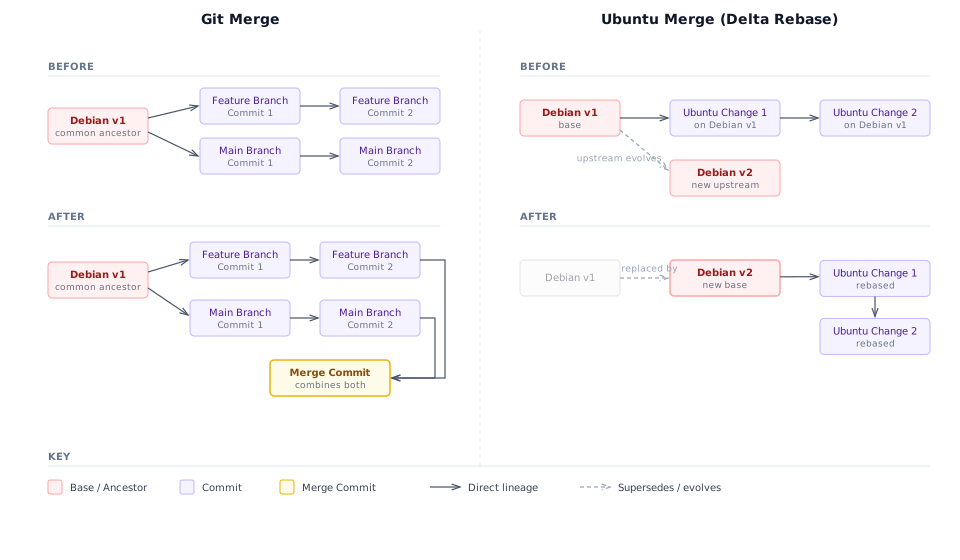
Merging is done using the git-ubuntu tool and is quite similar to a standard git rebase where commits from one point are replayed on top of another point.
At a more detailed level, there are other sub-tasks to be done, including:
Splitting large, “omnibus”-style commits into smaller logical units (one commit per logical unit).
Harmonizing
debian/changelogcommits into two commits: a changelog merge and a reconstruction.
With this process, we keep the Ubuntu version of a package cleanly applied to the end of the latest Debian version and make it easy to drop changes as they become redundant.
Merge-o-Matic
For a list of packages that have changed in Debian but not merged into Ubuntu, see the Merge-o-Matic tool: